by Aziz
on
Saturday, December 08, 2007
There are several reasons to consider browsing anonymously and through an encrypted Virtual Private Network (VPN), not just to access porn or log onto Second Life as the opposite gender. It's your financial information and career that could be at risk.
Consider what would happen if your boss came to know your home IP address and searched the Internet for your postings and online activities by IP address. Or worse yet, if your boss's competitor, or your competitor tapped into your confidential online business communications.
Owning your own business means you are a primary target for industrial espionage - and most small businesses never think twice about their communications security. The vast majority of espionage, worldwide, is for economic and business data, trade secrets, buying patterns, economic and financial patterns. One ill-advised email that can be traced back to you could sink your company.
With Christmas around the corner, last minute shopping online is inevitable. But are you sure that your credit card or paypal details are safe? It's highly possible that your credit card details land on a hacker's hard disk before it reaches the merchant's bank.
With the growing issue of government intrusion into private affairs, both personal and economic, VPN and anonymous surfing has become even more compelling. Google recently handed over the IP address of a user of its blogging software to an Israeli court after the author was accused of slandering Israeli politicians. Yahoo has been heavily criticized for handing over details about its users to the Chinese authorities that have led to the jailing of three people who criticised the Chinese government online.
The only solution to all these problems is anonymous browsing with Virtual Private Networking. VPN provides you a shield of encryption against spies and hackers; and an untraceable IP address for anonymous browsing.
Apart from the security aspect a Virtual Private Network also lets you access restricted websites in your country or company. And unlike web proxies Virtual Private Networks are much faster and reliable.
Blacklogic.com provides Anonymous Surfing with their 128 bit encrypted VPN Service for US$5 a month with a 150 MB daily traffic limit. You can get an unlimited VPN Service for US$15 a month.
»
Continue reading
Read more on
Internet
by Aziz
on
Friday, November 09, 2007
Choosing a
broadband service provider could prove to be a herculean task, given the number of options and providers. In the UK alone there are around 68 providers of
broadband services. However, BT, the privatised UK state telecommunications operator, has a cut above the others.
BT Group is currently the largest communications service provider in the United Kingdom and in Europe. It is also one of the largest communication companies in the world.
BT has six broadband plans with three for home users under the BT Total Broadband brand and three for business users under the BT Business Total Broadband brand. Home plans start from £17.99 a month and business plans from £19.79. All plans come with up to an 8Mbps download speed. Option 3 of BT Total Broadband provides an Unlimited download connection at just £24.99 per month.
What makes BT stand out is that it offers a Broadband Router cum Modem cum Wireless Access Point free of cost on all its plans except the basic home plan. However, you can upgrade to the Wireless Home Hub on the basic home plan for a one time fee of £30. Also you get a whopping 5GB of free online storage.
»
Continue reading
Read more on
Internet,
Reviews
by Aziz
on
Thursday, November 01, 2007
Daftdoggy is a website that lets you do just that for free. You can record a websurfing session and then save it as a link to share with others. You could use it to give someone a guided tour around the Intenet, from a single ink.
Daftdoggy also lets you edit the recorded web-surfing session to add comments and teaching notes. On playback there is a small blue box at the bottom of the page which, when you place your mouse over, gives a translucent screen containing whatever you'd like to say about a particular webpage. So now you can tell people why you want them to see a certain webpage. You can point out what's good and bad about the page before moving on to the next one.
Here's a quick example of what I mean. It's a link that takes you through a few resources on Alexander The Great.
Here's another example that takes you through a "videojukebox" of Amy Winehouse on YouTube. (When recording active content such as YouTube, Daftdoggy won't show the media that you're recording but it will on playback).
Another way people are using DaftDoggy is to use it as an online favorites page that stores all of their sites when they're away from their own systems.
»
Continue reading
Read more on
Internet,
Screencasting
by Aziz
on
Monday, August 27, 2007
Buying stuff on the internet isn't popular because of the growing incidence of credit card fraud.
Enter the "webcard" -- already available in the UK from the Internet bank Cahoot. Each time you want to buy something, you log on to your Cahoot account and it issues you with a credit card number you can use for your purchase. Unlike a normal credit card, this number is different every time -- so it can't be used again if it falls into the wrong hands. You can even specify a spending limit to prevent a site from over charging you. More information and a demo at
www.cahoot.co.uk
»
Continue reading
Read more on
Internet,
Shopping
by Aziz
on
Friday, August 24, 2007
Need to settle a trivia dispute fast? Richard Blewett, a "Trivial Pursuit" question editor for the games company Hasbro, suggests these websites:
Movies: IMDB.com posts film facts. Were you aware that Tom Hanks is a descendant of Nancy Hanks, Abraham Lincoln's mother?
History: Bartleby.com is an online reference publisher and features historical facts and quotations. The home page also features a list of links to other reference-book sites.
Celebs and TV: Hollywood.com can tell you in which film Jennifer Aniston was menaced by a killer leprechaun, and other details about celebs.
Music: Billboard.com's "Music Info Search" lets you keep up the names of recording artists, song titles and lyrics.
»
Continue reading
Read more on
Entertainment,
Internet
by Aziz
on
Wednesday, August 15, 2007

Billions of emails are sent daily, many across the world, some between one desk and the next -- plenty of opportunity to inadvertently offend or annoy, especailly in a work situation. So:
Be brief. Emails that are more than a screen long are daunting and irritating. With friends you can be chattier.
Style counts. Spell check notes before you hit "send." Writing using ALL CAPITAL LETTERS signifies shouting; all small letters is hard to read.
Answer promptly. At work, respond within the day. When you are out for a day or more, program an "I'm away" auto reply.
Ignore chain mail, jokes and petitions. Almost no one likes them. Resist forwarding them unless they seem highly relevant.
Identify yourself. For business emails, create a standard sign-off that includes your full name, title, phone number, address and any pertinent infromation about your company.
»
Continue reading
Read more on
Email,
Internet,
Tips and Tricks
by Aziz
on
Tuesday, July 17, 2007

Next time a woman says she can't leave her computer it may be because it's her turn to deal. Women have edged out men when it comes to playing online games -- 50.4% vs 49.6%, according to a study by PC Data Online. While Nielsen NetRatings says men like sites that feature action games, women favour tamer dotcom fare at the following free internet game sites:
»
Continue reading
Read more on
Computers,
Gaming,
Internet
by Aziz
on
Sunday, July 08, 2007

If you really want to know something, don't email your question to hordes of people. Researchers have found that the more people you email, the more likely each recipient is to ignore it.
Greg Barron and Eldad Yechiam emailed 240 colleages at Technion Israel Technology Institute -- individually or in a group -- to find out response rates. Posing as a female student, they asked people if the institute had a biology faculty.
Replies ranged from "very helpful" (with extra information) to plain brusque "Look on the web page!". Others simply tried to chat "her" up.
Only half of group recipents responded, compared with 64 percent of those with just their own name in the "To" box. Single recipients were also twice as likely to be "very helpful".
"Like bystanders at a crime scene, people assume that someone else will help," says Barron. "So if you want a volunteer to bring a cake to Monday's meeting, sending an email to lots of people might not be the way to go."
»
Continue reading
Read more on
Computers,
Email,
Internet
by Aziz
on
Monday, July 02, 2007

Shielding your home computer from online threats is easier than you think. Try these simple defensive steps:
Update your OS. Whether you use the Windows or Mac operating system (OS), it must be updated regularly to shore up your computer's defenses. On a PC, go to "Windows Update" under the Start icon and click to install all security-related updates. On a Mac, go to "Software Update" in your system Preferences (OS X) or under Control Panels (OS 9). Set the feature to update automatically each week.
Install a firewall. Hackers can enter your computer if you don't have a firewall in place, such as ZoneAlarm (free), which can warn you each time your computer accesses the Web.
Install antivirus software. You need the most up-to-date anti-virus programs to ensure your hard drive and e-mail are uninfected. Two popular brands are Symentec's Norton AntiVirus and McAfee's Internet Security Suite. Run the software weekly.
Fight spyware. Spyware enters your computer when you're online, and reports your activities to companies that then try to sell you products. To remove spyware, download an anti-spyware program such as Ad-Aware (free). Run the program daily.
Change web browsers. Viruses that enter your PC via Internet Explorer can do serious damage. Consider trying a free alternative such as Mozilla Firefox.
»
Continue reading
Read more on
Computers,
Internet,
Tips and Tricks
by Aziz
on
Friday, June 29, 2007
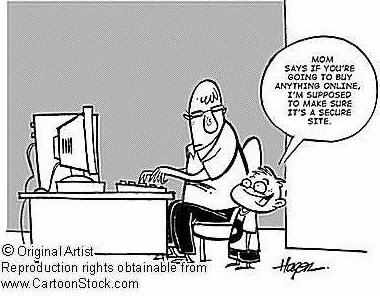
Protecting your privacy is harder when shopping online because you're asked to fork over sensitive data. Here's what Jay Foley at the Identity Theft Resource Centre suggests to minimize exposure:
Change your identity. Create a new email address exclusively for online stores that require one. This dummy address will wind up receiving future junk emails. Then each week, trash all the spam from your "shopping" address.
 Look for the lock. Before filling out any on-screen form asking for credit card data, verify that you're at a secure Web page. The URL in the field at the top of your screen should begin with "https://" and look for a locked padlock icon in the lower-left corner of the screen.
Send spies packing. If you download free software, "spyware" may have been secretly attached by a third party to monitor your surfing habits. Spychecker.com offers free software that detects and removes spyware from your hard drive.
»
Continue reading
Read more on
Computers,
Internet,
Shopping,
Tips and Tricks
by Aziz
on
Friday, June 22, 2007

Need a quick passport size photo? Simply take a digital photo of your face in front of a white background and upload it online to
ePassportPhoto.com. You can crop it on the site and you'll get an image file to save back to your own computer. If you own a digital camera and color printer, the service will cost you noting. What's more, you can keep snapping photos until you're happy with the result.
»
Continue reading
Read more on
Computers,
Digital Cameras,
Internet,
Photography,
Tips and Tricks
by Aziz
on
Tuesday, June 19, 2007

The Internet is a great way to share information, but also to spread lies and mischievous nonsense. When you get an unsolicited email, these warning signs, from
urbanlegends.about.com, should ring alarm bells:
- The text was not originally written by the person who sent it to you.
- Phrases such as "This is NOT a hoax..."
- ...Or "Forward this to everyone you know."
- Overly emphatic language or heavy use of CAPITALS and exclamation marks!!!!!!!!
- Language that seems more geared to persuade than to inform.
- Claims to offer important information you've not heard before from legitimate sources.
- Subtle jokes that might suggest leg pulling.
- No reference to outside sources nor links to websites with corroborating information.
- Replies with "Re:" in the subject title from people you haven't written to.
»
Continue reading
Read more on
Computers,
Email,
Internet,
Tips and Tricks
by Aziz
on
Monday, June 18, 2007

Few careers can now do without email. How effectively do you deal with it? Take this true-or-false quiz to find out!
- Emails should be short.
- The subject line should be short.
- All messages should be marked urgent so people will read them.
- You should respond to email messages within 24 hours.
Answers:
- True. People don't have time to read pages of material on a screen. If your message is longer than screen-length, send it a different way.
- False. With so much spam around, many people won't open an email unless they know who it's from or the subject is clear. Writing hi, or leaving the subject line black, leaves the reader confused.
- False. People will know you always do this and won't consider your e-mail urgent, even when it is.
- True. If you don't have the info, send an email to acknowledge you got their message and let them know when you'll have the info.
»
Continue reading
Read more on
Computers,
Email,
Internet,
Tips and Tricks
by Aziz
on
Friday, June 01, 2007
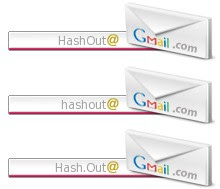
Lots of people still ask, "Does your e-mail ID use capitals or lower case?" But that question is a technical no-brainer, because it simply doesn't matter whether you use capitals or lower case -- meaning small letters -- in an email address. The email will be delivered anyway: you may type the address with all capitals, all lower case, or randomly combine both.
Yet there's one place where capitals can secure your emails: in your password. Having a password like "ScoRPioN" or "sCorpiON" instead of a plain "scorpion" makes it tougher to hack.
You might also be surprised to note that having an email address like "John.Smith@gmail.com" on Gmail is equivalent to "JohnSmith@gmail.com" or for that matter even any other combination like "J.ohnSmith@gmail.com" or "J.o.hnSmith@gmail.com" or "Jo.hnSmith@gmail.com".
That is, Gmail does not consider "." as part of the email address and removes all "." from the email address before delivering messages to the particular inbox. If you have dots in your gmail address or even if you don't have a dot, just try sending yourself and email by placing a dot somewhere or switching the position of the dot in your email address, before the @ symbol but ofcourse and look you've got a mail!.
It also means that if someone already has an email address say "a.bc@gmail.com" then all other combinations of the same letters in the same order with different numbers and positions of dots will be unavailable for signup. For example "abc@gmail.com" or "a.b.c@gmail.com" or "ab.c@gmail.com" will be unavailable for signup in the case of the above email address.
»
Continue reading
Read more on
Computers,
Email,
Internet
by Aziz
on
Thursday, May 31, 2007

Tired of playing a video game endlessly without ever getting to the end? Do you ever wonder if there is really any end to the game you've been playing since time immemorial? If trying to get to the end seems to be practically impossible then just satisfy yourself having a look at the climactic final screens of classic arcade video games on the Internet at
The Video Game Museum. You can even try to impress video game addicts by showing them how the game they play endlessly actually ends.
»
Continue reading
Read more on
Computers,
Gaming,
Internet
by Aziz
on
Wednesday, May 30, 2007

You forgot to wish your mom on her birthday, your dentist's appointment, to pick up the dry cleaning. Maybe what you need is your own personal secretary -- or an e-mail reminder service. You'll find several ones on the Internet, like
www.memotome.com. With this one, all you have to do is register and enter what you want to remember -- whether it's to pick up laundry detergent or a gift for your parents' 50th wedding anniversary -- and the service will e-mail you reminders as far in advance and as often as you like.
You can also choose to be reminded of weekly, monthly, yearly or one-off events.
Before you register with any email reminder service, read its privacy policy: Some may share their registrant's email addresses with direct marketers or spammers.
»
Continue reading
Read more on
Internet,
Tid Bits
by Aziz
on
Monday, May 28, 2007

No need to try out wigs or believe your hairstylist the next time you plan to change your hairstyle. Explore new cuts and colors on the Internet for free at
Clairol's Try It On Studio or
iVillage's Makevoer-o-Matic. Pick a model who looks like you or just upload your photo, and have fun playing or take a printout or transfer it to your iPod / Mobile phone to show it to your hairstylist.
The Makeover-o-Matic has a dozen models with different face shapes, over 30 different cuts - short, medium and long - and full-color spectrum for hair and makeup. There are even accessories, such as glasses, that you can add to test the new you for all occasions.
»
Continue reading
Read more on
Internet,
Lifestyle,
Tid Bits
by Aziz
on
Saturday, May 26, 2007

You probably don't need one more time-wasting website, but we can't resist suggesting a look at
swivel.com. This is sort of a YouTube for excel files, where people can upload statistics. The results are some really amusing graphs, such as comparison between wine consumption and violent crime or how when the temperature goes down in Apple's headquarters city of Cupertino, Calif., the company's stock price goes up - maybe because employees are staying inside and working more?
»
Continue reading
Read more on
Internet,
Tid Bits,
Web 2.0
by Aziz
on
Thursday, May 24, 2007

Fed up with your current life? Want another one on the side to spice things up? You got it. Log on to
www.secondlife.com, a 3-D virtual world entirely built and owned by its residents. More than six million people from around the word virtually live here. Residents can meet other residents, socialize, get involved in individual and group activities and even trade. The only thing you can't do here is go to the bathroom. Or eat and drink. For that, you'll have to visit the real world once in a while.
»
Continue reading
Read more on
Internet,
Lifestyle,
Web 2.0
by Aziz
on
Saturday, May 12, 2007



 »
» 
