
It's a brand new year. So why not pep up the office (or the home office) for a brand new start. May be you could get some new office furniture, office supplies, a brand new Apple Macintosh or a nice comfortable ergonomic office chair for yourself! Ah, I know what you are thinking about. Don't you worry. You don't need to burn a hole in your pocket.
Just visit OfficeDeals.info to grab thousands of discount coupons, coupon codes and promotional offers from OfficeDepot.com, Staples.com, Office Max, Vistaprint, Apple Store, HP Store, Dell Computer, Best Buy, Stamps.com and hundreds of other stores selling office supplies, discount office furniture and computers.
OfficeDeals.info scours the Internet for new discount coupons, coupon codes and promotional offers and the website is updated on a daily basis.
I would only wish they added an RSS feed, so that I could get the latest discount coupons, coupon codes and promotional offers right in my feed reader, the moment they are published.
OfficeDeals.info might also be useful if your are looking for some useful tips on getting a small business credit card, setting up a home business, benefits of a home business and tips on working from home.
» Continue reading
Showing posts with label Computers. Show all posts
What's that drum doing under your table?
 Don't be surprised when you find a drum like thing on or under your friend's desk. It could very much be Spotswood Custom Computers' custom built PC cabinet specially and individually handcrafted from high quality raw maple veneer plywood shell/cylinder, to replicate a bass drum.
Spotswood's Computer Cabinets are built from the scratch and are not modified versions of pre-made drums. Its available in seven stained colors - Natural, Light Oak, Dark Oak, Candy Apple Red, Golden Yellow, Blue and Purple.
The L-20 and C-20 Models are large enough to house two of the extremely long (10.5") graphics cards that are currently on the market. Equivalent to a conventional, full-tower size rectangular case, it has enough room to house an ATX form factor motherboard, power supply, four to five internal 3.5" drives and either one external slimline/notebook CD/DVD drive or two 5.25" external CD/DVD drives. A 3.5" I/O panel on the front of the case contains four USB 2.0 ports, one FireWire port, one headphone and one microphone connection.
L-18 and C-18 on the other hand can accomodate only three internal 3.5" drives and one external slimline/notebook CD/DVD drive. The L-18 has even received a '100% KICKASS' review rating from 3dGameMan.com.
The heat generated within the case is expelled by a rear 120mm exhaust fan, a 120mm blowhole fan, and a side 140mm intake LED fan.
Optional features include choice of the number of external drive bays, side panel colors, fans, hard drive activity and power LED colors, lugs, motherboard trays and wood stain colors.
You might worry the "Drum" like custom PC cabinets may emit sounds as loud as the drum. But Spotswood claims that their PC cases are "actually quieter than a metal case".
A perfect product for a Home Theater PC case, the L-Series and C-Series is, as the Computer Source Magazine puts it, "...a truly unique piece of work and is a fantastic gift for the music lover and computer geek alike."
If you have used this cabinet or gifted it to someone, do hash out your review about the Spotswood Custom Drum PC Case/Cabinet. » Continue reading
Read more on Computers, Gifts, Lifestyle, Technology


Games women and men play
 Next time a woman says she can't leave her computer it may be because it's her turn to deal. Women have edged out men when it comes to playing online games -- 50.4% vs 49.6%, according to a study by PC Data Online. While Nielsen NetRatings says men like sites that feature action games, women favour tamer dotcom fare at the following free internet game sites:
- Bingo.com: Players vie for prizes.
- JigZone.com: Features hundreds of jigsaw puzzles.
- Boxerjam.com: Compete on inetractive game shows.
How are old black and white films converted into colour?

The film is transferred to digital tape. Then, the first time each shade of grey appears, it is coloured manually on a graphics computer and given an identification code. Every time the grey reappears the computer colours it automatically. The process was first used in 1985 on the James Cagney classic Yankee Doodle Dandy. Though the technique was successful for video, the results were not good enough for big-screen projection. Today's advanced film scanners and recorders mean this is now possible, but colorization has largely died out following film industry complaints that the process distorts the original intentions of filmmakers. » Continue reading
Read more on Computers, Entertainment, Technology, Tid Bits
Spamming won't get the answer
 If you really want to know something, don't email your question to hordes of people. Researchers have found that the more people you email, the more likely each recipient is to ignore it.
Greg Barron and Eldad Yechiam emailed 240 colleages at Technion Israel Technology Institute -- individually or in a group -- to find out response rates. Posing as a female student, they asked people if the institute had a biology faculty.
Replies ranged from "very helpful" (with extra information) to plain brusque "Look on the web page!". Others simply tried to chat "her" up.
Only half of group recipents responded, compared with 64 percent of those with just their own name in the "To" box. Single recipients were also twice as likely to be "very helpful".
"Like bystanders at a crime scene, people assume that someone else will help," says Barron. "So if you want a volunteer to bring a cake to Monday's meeting, sending an email to lots of people might not be the way to go." » Continue reading
Is your computer data safe?
 Shielding your home computer from online threats is easier than you think. Try these simple defensive steps:
Update your OS. Whether you use the Windows or Mac operating system (OS), it must be updated regularly to shore up your computer's defenses. On a PC, go to "Windows Update" under the Start icon and click to install all security-related updates. On a Mac, go to "Software Update" in your system Preferences (OS X) or under Control Panels (OS 9). Set the feature to update automatically each week.
Install a firewall. Hackers can enter your computer if you don't have a firewall in place, such as ZoneAlarm (free), which can warn you each time your computer accesses the Web.
Install antivirus software. You need the most up-to-date anti-virus programs to ensure your hard drive and e-mail are uninfected. Two popular brands are Symentec's Norton AntiVirus and McAfee's Internet Security Suite. Run the software weekly.
Fight spyware. Spyware enters your computer when you're online, and reports your activities to companies that then try to sell you products. To remove spyware, download an anti-spyware program such as Ad-Aware (free). Run the program daily.
Change web browsers. Viruses that enter your PC via Internet Explorer can do serious damage. Consider trying a free alternative such as Mozilla Firefox. » Continue reading
Read more on Computers, Internet, Tips and Tricks
Stealth Shopping on the Web
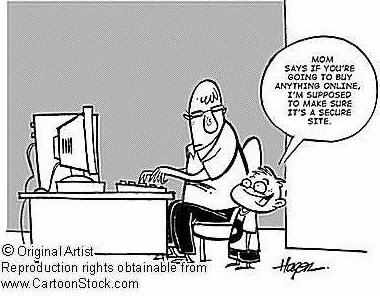 Protecting your privacy is harder when shopping online because you're asked to fork over sensitive data. Here's what Jay Foley at the Identity Theft Resource Centre suggests to minimize exposure:
Change your identity. Create a new email address exclusively for online stores that require one. This dummy address will wind up receiving future junk emails. Then each week, trash all the spam from your "shopping" address.
 Look for the lock. Before filling out any on-screen form asking for credit card data, verify that you're at a secure Web page. The URL in the field at the top of your screen should begin with "https://" and look for a locked padlock icon in the lower-left corner of the screen.
Send spies packing. If you download free software, "spyware" may have been secretly attached by a third party to monitor your surfing habits. Spychecker.com offers free software that detects and removes spyware from your hard drive. » Continue reading
Read more on Computers, Internet, Shopping, Tips and Tricks
Women swoon for hi-tech woo
 Men looking to further their romance with flowers may want to think tech instead. A small Amazon.co.uk study at the University of Hertfordshire, UK, measured women's reactions to gifts: They showed most arousal when imagining getting electronic gadgets. In addition, a study of 1000 people found six in ten women said their love lives suffered if they had no mobile phone or hand-held computer with them.
» Continue reading
Men looking to further their romance with flowers may want to think tech instead. A small Amazon.co.uk study at the University of Hertfordshire, UK, measured women's reactions to gifts: They showed most arousal when imagining getting electronic gadgets. In addition, a study of 1000 people found six in ten women said their love lives suffered if they had no mobile phone or hand-held computer with them.
» Continue reading
Read more on Cell Phones, Computers, Gadgets, Lifestyle, Technology, Tips and Tricks
Some tips to keep your CDs and DVDs clean and your players healthy
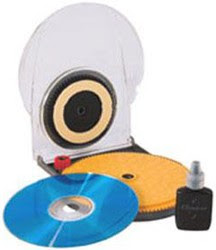 Be it the Beatles CD you play in the car, the precious Spiderman 3 DVD you got for your birthday or the CD-ROM with the snaps from your last holiday, chances are you have no idea what to do if the toddler in your life leaves her mark on any of them, let alone how to care for a disc at the best of times. Some tips from the Optical Storage Technology Association:
- Always hold CDs and DVDs by the outside edge or the centre hole.
- Store discs in plastic cases in a box, drawer or cabinet away from light, heat, dust and humidity.
- Blow off any dust that settles on discs to keep it out of your player.
- Clean discs using a soft, dry, lint-free cloth or camera lens tissue. Gently wipe from the centre to the outer edege in a straight line; do not rub in circles or around the disc.
CD cleaning fluids may help to remove sticky fingerprints. » Continue reading
Read more on Computers, Tips and Tricks
How to get a quick passport size photo?
 Need a quick passport size photo? Simply take a digital photo of your face in front of a white background and upload it online to ePassportPhoto.com. You can crop it on the site and you'll get an image file to save back to your own computer. If you own a digital camera and color printer, the service will cost you noting. What's more, you can keep snapping photos until you're happy with the result.
» Continue reading
Need a quick passport size photo? Simply take a digital photo of your face in front of a white background and upload it online to ePassportPhoto.com. You can crop it on the site and you'll get an image file to save back to your own computer. If you own a digital camera and color printer, the service will cost you noting. What's more, you can keep snapping photos until you're happy with the result.
» Continue reading
Read more on Computers, Digital Cameras, Internet, Photography, Tips and Tricks
Tips for printing Digital Photos
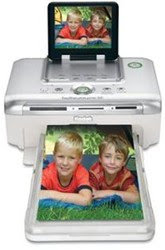 Capture great memories and moments with tips on printing digital photos.
Fan your paper first
Before you put it into the paper tray, bend the stack and run your finger along the edge. This ensures the sheets feed flawlessly.
Select the right paper setting
Many HP photo printers with optical sensors for paper type allow you to select the actual name of the paper you are using. Use it to enhance paper feed and print quality.
Don't stack your photos
Don't stack your photos before they are totally dry. This may cause the photo below to stick onto the back of the one above.
Leave them to dry before storing
Resist the temptation to slot your phtos into a photo album the moment they are printed. Air them in a cool place to dry them before storing.
Keep them protected
Exposing your photos to air and moisture causes them to fade or turn yellow. Store your photos in an album or photo frame to protect them. » Continue reading
Read more on Computers, Digital Cameras, Photography, Tips and Tricks
How to spot an email hoax

The Internet is a great way to share information, but also to spread lies and mischievous nonsense. When you get an unsolicited email, these warning signs, from urbanlegends.about.com, should ring alarm bells:
- The text was not originally written by the person who sent it to you.
- Phrases such as "This is NOT a hoax..."
- ...Or "Forward this to everyone you know."
- Overly emphatic language or heavy use of CAPITALS and exclamation marks!!!!!!!!
- Language that seems more geared to persuade than to inform.
- Claims to offer important information you've not heard before from legitimate sources.
- Subtle jokes that might suggest leg pulling.
- No reference to outside sources nor links to websites with corroborating information.
- Replies with "Re:" in the subject title from people you haven't written to.
Read more on Computers, Email, Internet, Tips and Tricks
First e-Impressions
 Few careers can now do without email. How effectively do you deal with it? Take this true-or-false quiz to find out!
- Emails should be short.
- The subject line should be short.
- All messages should be marked urgent so people will read them.
- You should respond to email messages within 24 hours.
- True. People don't have time to read pages of material on a screen. If your message is longer than screen-length, send it a different way.
- False. With so much spam around, many people won't open an email unless they know who it's from or the subject is clear. Writing hi, or leaving the subject line black, leaves the reader confused.
- False. People will know you always do this and won't consider your e-mail urgent, even when it is.
- True. If you don't have the info, send an email to acknowledge you got their message and let them know when you'll have the info.
Read more on Computers, Email, Internet, Tips and Tricks
Speeding up a sluggish computer
 Steps to take before spending money on costly upgrades.
Empty the trash. Files dragged to the trash icon may be out of sight, but they continue to eat up valuable space. Only when the trash is emptied is space freed up.
Restart your computer. Even when you quit a program, large ones may continue to siphon off memory. Restarting (or "rebooting") adjusts this problem.
Fix fragmented files. Over time, files on your hard drive may become fragmented, i.e. a file may be broken up into pieces and written on different far away locations on the hard disk drive, requiring more time to read the file from the hard disk drive. Most PCs come with a defragment program. In Windows you can find it under Programs > Accessories > System Tools > Disk Defragmenter.
Purge old e-mail files. Many e-mail programs save copies of every message you send. Empty or reduce this backup file to free up hard-drive space. If necessary, ask your e-mail service to help locate the files.
Switch off start-ups. Programs that support instant messaging and calendars begin running as soon as you start your computer and use up its resources. You're better off turning them on as needed. » Continue reading
Read more on Computers, Technology, Tips and Tricks
Straighten out your cyberkids
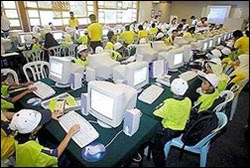 A recent Australian study found that 60% of children using computers at school showed early signs of repetitive strain injury. Here are some at-your-desk exercises for young PC-users. (Do them gently; if you feel pain see your doctor.)
- Stretch your arms above your head and spread your fingers. Then lower your arms so they're straight out in front. Hold for a few seconds.
- Push the bottom of your right palm against the top of your left palm, so you feel a stretch along the underside of your left forearm. Repeat on the other side. Now do it pushing on the backs of your palms.
- In a chair with your back straight, look over your right shoulder. Then slowly move to look over your left shoulder. Go back to the center and nod slowly three times. Then turn your head in a "no" motion three times. Finally stretch as if laying your head on each shoulder.
- Keep your hips forward and turn to look behind on each side, placing your arm across the back of the chair, stretching your back.
- Push your chin forward to stretch the jaw and neck.
- Sitting, roll each shoulder forward and around then back and around. Then lift each shoulder up to your ear and down.
Cat walk on the keyboard
 Cats and computers don't mix. Any cat owner will tell you kitties like to walk, jump or sprawl on keyboards in just such a way as to uninstall software or even crash your computer. "For some cats, keyboards are like New Age sandals with rubber nubs pointing upwards onto their soles. Shiatsu for cats, maybe," says computer programmer Chris Niswander, inventor of PawSense, a program that can sense when a cat depresses multiple keys. One or two paw steps are enough for the software to block access to computer and emit anticat sounds -- a variety of annoying noises performed by Niswander. You can also record your own message such as "Bad kitty!"
You might also be interested to read: » Continue reading
Read more on Computers, Pets, Technology
Printing 3D
 I just dropped my mobile phone and the outer casing has broken. What do I do?
Probably go to the suppliers and check if they can encase my phone in a new body - not a cheap or easy task. The new casing costs almost a fourth of the price of the phone.
Exact replacement
Your spectacle frame has cracked. It is difficult to find the exact replacement, which will take the place of the same costly and well-worn pair of glasses. You are forced to compromise and order the nearest fit. Theses are the scenarios of yesterday and today. Now take a peak at tommorow -- not sometime in the distant future, but later this year:
You 'capture' the shape of an object - like a mobile phone case or a spectacle frame -- using special softare; then you turn on your 3-D printer, which looks exactly like your normal laser printer, only slightly larger.
You ensure that its 'printing' medium -- not ink in a cartridge but one filled with finely powdered plastic -- is adequate; you press 'print' on your PC -- and a new phone case or whatever, is created slowly, layer by layer, in front of your eyes. It dries in seconds and is ready to use -- may be after some sand papering to smooth the edges.
Congratulations, you have entered the era of three-dimensional (3D) printing.
Desktop Factory, a spin-off from the US based IdeaLab, promises that by end 2007, it will offer a consumer model of its 3D printer for under $5,000. IdeaLab's technology makes use of a halogen lamp to heat powdered plastic that adheres to a roller and a focused laser beam to fuse it, to form a one dimensional image of the object required.
Thus far the process is very similar to the way an image is fused in a laser printer. The 'image' is rolled on to a plate and prints as a layer, much as it would on paper in a normal printer.
Now is where 2D becomes 3D. The process is repeated again and again, depositing more layers, stacking one on top of another, in the 3rd dimension, to form the solid object. Heat is applied again to fuse all the layers into a single object.
Remember how one made paper mash items in school, by pasting layers of soaked and gummed paper on a mould to create bowls and vases? » Continue reading
Read more on Cell Phones, Computers, Gadgets, Technology
Useless Caps @ eMail
 Lots of people still ask, "Does your e-mail ID use capitals or lower case?" But that question is a technical no-brainer, because it simply doesn't matter whether you use capitals or lower case -- meaning small letters -- in an email address. The email will be delivered anyway: you may type the address with all capitals, all lower case, or randomly combine both.
Yet there's one place where capitals can secure your emails: in your password. Having a password like "ScoRPioN" or "sCorpiON" instead of a plain "scorpion" makes it tougher to hack.
You might also be surprised to note that having an email address like "John.Smith@gmail.com" on Gmail is equivalent to "JohnSmith@gmail.com" or for that matter even any other combination like "J.ohnSmith@gmail.com" or "J.o.hnSmith@gmail.com" or "Jo.hnSmith@gmail.com".
That is, Gmail does not consider "." as part of the email address and removes all "." from the email address before delivering messages to the particular inbox. If you have dots in your gmail address or even if you don't have a dot, just try sending yourself and email by placing a dot somewhere or switching the position of the dot in your email address, before the @ symbol but ofcourse and look you've got a mail!.
It also means that if someone already has an email address say "a.bc@gmail.com" then all other combinations of the same letters in the same order with different numbers and positions of dots will be unavailable for signup. For example "abc@gmail.com" or "a.b.c@gmail.com" or "ab.c@gmail.com" will be unavailable for signup in the case of the above email address. » Continue reading
Does the game ever end?
 Tired of playing a video game endlessly without ever getting to the end? Do you ever wonder if there is really any end to the game you've been playing since time immemorial? If trying to get to the end seems to be practically impossible then just satisfy yourself having a look at the climactic final screens of classic arcade video games on the Internet at The Video Game Museum. You can even try to impress video game addicts by showing them how the game they play endlessly actually ends.
» Continue reading
Tired of playing a video game endlessly without ever getting to the end? Do you ever wonder if there is really any end to the game you've been playing since time immemorial? If trying to get to the end seems to be practically impossible then just satisfy yourself having a look at the climactic final screens of classic arcade video games on the Internet at The Video Game Museum. You can even try to impress video game addicts by showing them how the game they play endlessly actually ends.
» Continue reading
Tips to save printer ink
 Color printer cartridges are costly, but there are ways to extend their lives, says Glenn Menin of PC Magazine Labs:
- Before printing, adjust your computer's print quality to "draft" and use less ink.
- When possible, use only the black-ink option, even when printing color pages.
- While printing web pages, just highlight (or copy and paste in a sparate file, preferably in a word processor to preserve the text formatting) only the text you want rather than printing everything on the screen.
- Most printer drivers today have a print preview option that lets you see what exactly you are going to get even before you actually print it. Use it to save wastages.
- Use your printer ink cartridges, both black and color, atleast once a week. Even if you don't have a need to take a print out, just print something small or run a diagnostic test.
- Use generic or compatible print cartridges which are almost half the cost of an original manufacturer brand OEM print cartridge. They are a definite money saver, especially for bulk black and white print jobs.
How to save printer ink?
How to save ink on bulk printing jobs
Ways to save ink when printing web pages
Printer utilities to save paper and printer ink
Printer software to save printer ink cartridges » Continue reading
Read more on Computers, Tips and Tricks

