
 Steps to take before spending money on costly upgrades.
Empty the trash. Files dragged to the trash icon may be out of sight, but they continue to eat up valuable space. Only when the trash is emptied is space freed up.
Restart your computer. Even when you quit a program, large ones may continue to siphon off memory. Restarting (or "rebooting") adjusts this problem.
Fix fragmented files. Over time, files on your hard drive may become fragmented, i.e. a file may be broken up into pieces and written on different far away locations on the hard disk drive, requiring more time to read the file from the hard disk drive. Most PCs come with a defragment program. In Windows you can find it under Programs > Accessories > System Tools > Disk Defragmenter.
Purge old e-mail files. Many e-mail programs save copies of every message you send. Empty or reduce this backup file to free up hard-drive space. If necessary, ask your e-mail service to help locate the files.
Switch off start-ups. Programs that support instant messaging and calendars begin running as soon as you start your computer and use up its resources. You're better off turning them on as needed. » Continue reading
Read more on Computers, Technology, Tips and Tricks


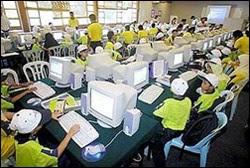 A recent Australian study found that 60% of children using computers at school showed early signs of repetitive strain injury. Here are some at-your-desk exercises for young PC-users. (Do them gently; if you feel pain see your doctor.)
 Cats and computers don't mix. Any cat owner will tell you kitties like to walk, jump or sprawl on keyboards in just such a way as to uninstall software or even crash your computer. "For some cats, keyboards are like New Age sandals with rubber nubs pointing upwards onto their soles. Shiatsu for cats, maybe," says computer programmer Chris Niswander, inventor of
 Vehicles of the future may keep an eye on their drivers, rousing you if you start to nod off, thanks to new technology that can scan your face for signs of drowsiness.
 It turns out that batteries aren't as "perishable" as we thought. "You can buy batteries in value packs and store them up to five years witout fear that their energy wll drain," says Mark Connelly, Consumer Reports director of appliance testing. Just don't toss loose batteries into a shoebox with metal objects. They can touch and lose power. As for putting batteries in the fridge, the chill does not preserve or extend their life by much, Connelly says. Here's a battery-buyer's guide:
 Remember when shopping for a camera was easy? Fiddle with a few models, pick one and go home happy. Today you practically need a degree in computer science and three months just to research the right one.
 Newer Posts

